Tips to Avoid Email Being Captured by Filters
SPAM and Junk Filters are an unavoidable function of email. While they are designed to keep the recipient safe, they can also block legitimate email from reaching their destination. We'll show you ways to increase your chances of landing in inboxes.
While Lendware uses the top industry delivery methods for email, once an email is sent, it is up to the recipients email filters to decide where it ends up. There are a myriad issues that can arise from keywords and phrases that will inherently block an email from being delivered. It's imperative that build emails, especially mass emails, understand every aspect of a good and safe email. The most important things you can do is avoid the following mistakes.
The below steps and suggestions are not a guarantee or promise of successful email delivery. Lendware has already taken the steps required for securely delivering email using high quality services. Quality and thoughtful setup, structure and wording of emails will have a direct impact on email delivery, acceptance and routing to inboxes.
⚙️ For general tips on increasing email delivery and read rates, click here
⚠️ Emails are consonantly training email filters. The more emails arrive to inboxes, the better off you and your company will be in the long run.
- Email Subject
- Email Body
- Email Signature
Email Subject
An email subject is the first opportunity to get an email the attention is deserves. However, it can also be the easiest way to land in a junk or spam folder, or worse, blocked completely by email filters. The good news is that there are some very simple ways to not only ease delivery, but also make an email subject compelling and grab the recipient's attention.
How to get an email noticed:
- Add an emoji 👋 - Get noticed! Emojis are a great way to provide emotion and context at a glance.
- Touch emotions - "I am thankful for you...", "I'm here to help...", etc.
- Ask questions - "Are you ready ...?", "Do you want ...?", etc.
- Use first name merge field - Sometimes, a great way to get the attention of an email recipient is to use their first name in the subject. Use caution with this method, as often times, paid or website leads may not have an accurate first name.
Things to avoid:
- Loan and financial words - There are safe words and bad words. Often the best method to find what you should and should not use is to 'google it'. Try searching, "financial words to not use in email'. Even using terms like, "Tips to ensure your loan is approved" or "We have competitive mortgage rates" - while those may be the messaging you want to get across, those phrases will likely flag an email as spam or junk.
- Negative words - Try not to start on a down note. Not everything is sunshine and lollypops, however, being negative or using scare tactics can backfire. Being an actionable information powerhouse builds trust, doom and gloom may have the opposite effect.
- Promises and overt predictions - Never promise or make guarantees. That's what Loan Estimates, contracts and legal paperwork is for. Light predictions or thoughts can be useful, but specific predictions without clear resources can cause trouble or loss of trust.
👍 This concludes tips on creating a great email subject
Email Body - The actual email
Building high quality, compelling and informative email marketing is an art and an ever-changing practice. To truly learn how to do this, there are a large number of great sources, free and paid, available on the internet. Using a search engine or connecting with trusted advisors is a great way to get started.
For the purposes of this article, we will concentrate on the low-hanging fruit of what not to do and some best practices, just like with email subject above.
Things to do in an email:
- Be honest and factual - This doesn't mean be negative. It's important to remember that an email can be forever. Getting something wrong or suggesting something that isn't possible or not true can come back. Plus, honesty helps to build trust and respect.
- Be friendly and be kind - Trust and kindness does not go unnoticed. This will help get emails shared and build networking opportunities. A kind email will hopefully never be reported as spam, thus increasing the likelihood of future delivery.
- Build in HTML - With the help of a company's marketing department, if available, creating compelling emails that are compliant, visually appealing and informative will help get emails into inboxes, read and clicked or responded to.
- Opt-out links in all marketing emails - Don't worry, Lendware manages that automatically! 🎉
Things to avoid:
- Loan and financial words - There are safe words and bad words. Often the best method to find what you should and should not use is to 'google it'. Try searching, "financial words to not use in email'. Even using terms like, "Great financial opportunity..." or "Fast loan approval" - while those may be the messaging you want to get across, those phrases will likely flag an email as spam or junk.
- Text to Image ratio - At least 50%-60% text to images. While that might seem tough to calculate, looking at the email and how much physical space it taken up by images will give a pretty good estimation. Don't send one or many images with little to not text.
- Always include an email signature - See next section for tips. This not only helps with delivery, but is also required for any email sent for both marketing and transactional updates.
- Numbers and dollar signs - This can be a quick red-flag. While using a few numbers isn't detrimental, when combined with #1 above, it can be a quick trip to junk.
- No iframes or advanced HTML - Email clients are not designed like websites. Avoid using advanced HTML content in emails, including, but especially iframes. These can both cause adverse look, behavior or complete rejection of an email.
👍 This concludes tips on building an email that gets delivered
👍 This concludes tips on building an email that gets delivered
Email Signature
A well built email signatures includes not only the information we want them to know, like name, head shot, title, phone - but it must also include licensing info, legal company name, physical address website, and ideally a company compliant disclaimer.
The below image demonstrates each important element contained within an email signature. By using a signature with each of these elements, it will not only help maintain legal and company compliance, but will also assist with email delivery. It also provides all the information needed for the recipient to understand who is sending the email and how to contact them.
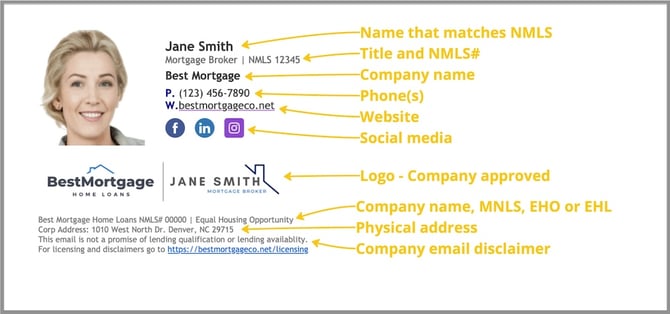
The parts that are required for licensed loan officers are:
Name - which must match NMLS name or registered alias
Title - this is important for the recipient to know who you are
NMLS - anyone who maintains a license must disclose the ID
Phone - can be a cell phone, office phone or unified communications phone
Company name - this must be specified to avoid any consumer confusion
Company NMLS - every lender must provide this ID for easy consumer lookup
EHO/EHL - 'Equal Housing Opportunity' or 'Equal Housing Lender' - if not sure which , contact company compliance. 'Equal Housing Lender' is usually only for banks.
Physical address - one must be specified and legally registered
Company email disclaimer - every company should have a standard email disclaimer
The parts that are not required, but are important to include are:
Head shot - this helps personalize an email and gives a sense of identity and connection
Website - this not only provides a way to submit an application, but will provide info about the sender and their company
Social media - these provide ways to connect long-term and learn more about the sender
Logo - especially if there is a team logo, this will help identify and build trust
Things that should not be part of an email signature are:
Every award - Signatures should be clean and straightforward. Awards work best on websites.
Too many calls-to-action - Schedule a call and apply are great - but too many will distract and confuse. Additionally, too many links can cause delivery issues.
Inappropriate images - This is in the eye of the recipient. Everyone is different, so G-rated and non-confrontational.
Incorrect or outdated info - This can cause a signature to be non-compliant or provide bad interactions. A dead link can cause frustration and also can cause delivery issues.
Too wide - Signatures that are too wide can detract from the email messaging and can break the formatting of an HTML email. If adding an HTML signature, try to keep it less than 500 pixels wide.
⚙️ To learn about ways to create and add a signature to a User Profile in Lendware, click here
👍 This concludes tips on building a quality and legally compliant email signature
Related Articles
Tips to Increase Email Delivery and Open Rates
Ensuring email lands soundly in an inbox is a bit like playing chess - rules are constantly changing, but there are so many ways to ensure a solid baseline. Once you hit an inbox, the open, read and click rates are where the magic happens. Email ...Communications Page Overview
The Communications page is your team's centralized inbox for managing email and SMS/text conversations with contacts. It’s designed to provide a clear, organized way to track all recent communications across your team. To get started, click on ...Add a Link to Any Image in an Email
You can make your emails more engaging by turning any image or animated GIF into a clickable link. This is a simple way to direct recipients to a webpage, video, or landing page — while also making your emails more interactive and visually appealing. ...Meet the AI Email Editor for AdHoc & Mass Emails.
Say goodbye to writer’s block! Our AI Email Editor helps you draft, polish, and perfect emails in just a few clicks directly in the AdHoc or Mass Email editors. This feature is currently in beta and not yet generally available. If you’d like early ...Preventing Unintended Emails in Lendware
Nobody likes sending an email by accident. Whether it’s an automation firing at the wrong time or someone who shouldn’t have access still being in a team, unintended emails can create confusion. This guide will help you keep your inboxes and teams ...