Merge Contacts Guide
Combine multiple contacts into one clean record while keeping key information intact.
Duplicate contacts can clutter your database and create confusion. The Merge Contacts feature allows you to combine multiple contact records into a single Target contact while carefully choosing which data fields to retain.
Select Contacts
- Navigate to your Contacts List.
- Select two or more contacts you want to merge.
- In the Mass Actions menu, click
 Merge.
Merge.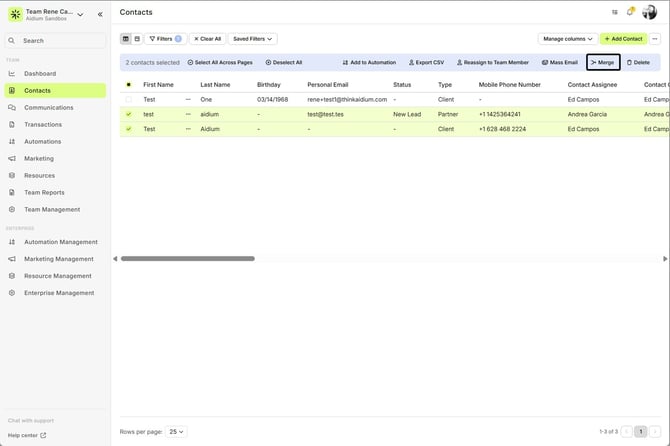
Step 1: Choose the Primary Contact
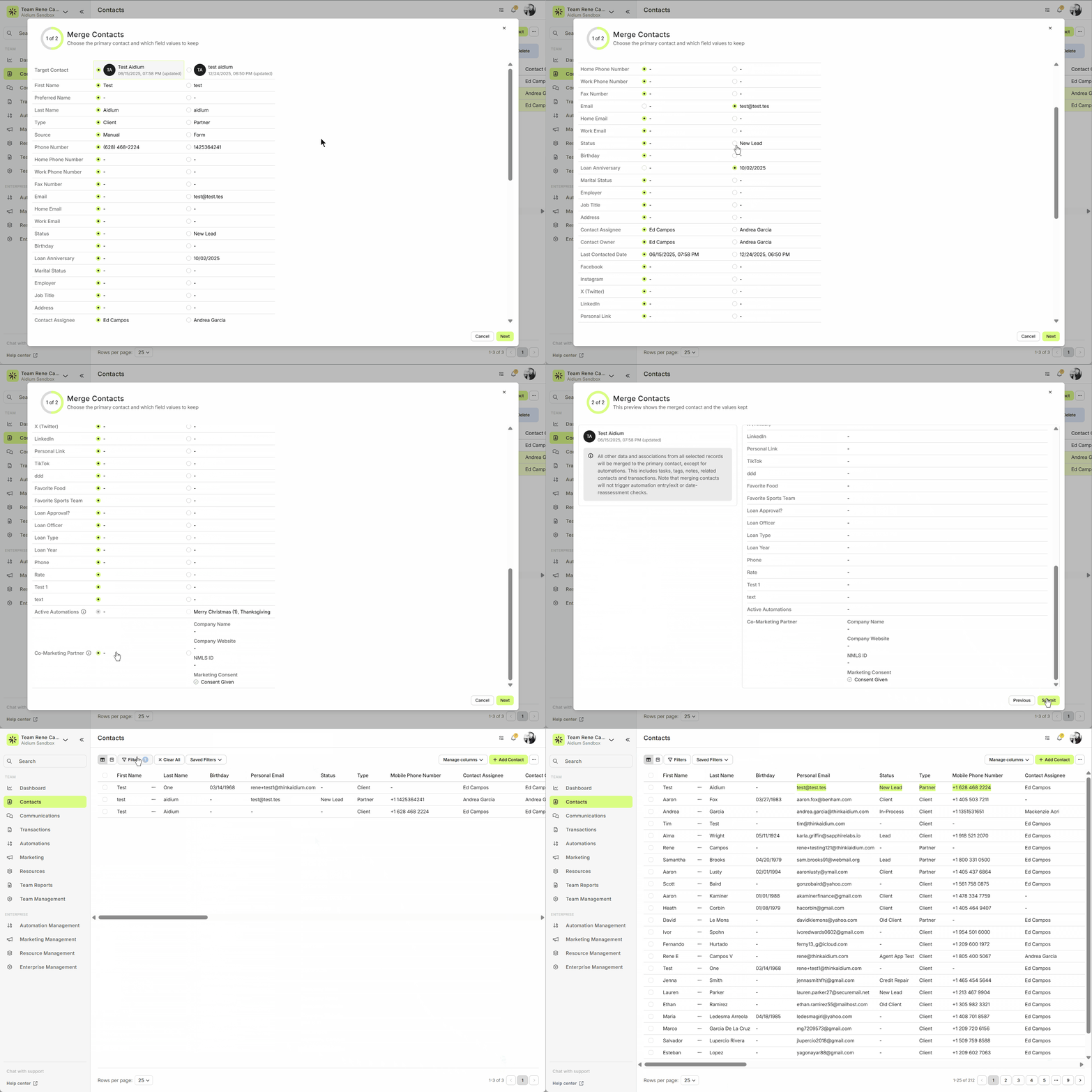
- The Merge Contact window will display all selected contacts with their key information: Name, Email, Phone, Status, Automations, Related Contacts, etc.
- Choose the Target record. This selects all of its field values by default. Note this contact is the one for whom active Contact automations are kept.
Review Automations & Data
Merging contacts does not trigger automation entry/exit or date-reassessment checks.
If you select a field value (email/phone) that is opted out, that opt-out status will carry over to the Target Contact.
- The “preferred” relationship (e.g., Referred By, Business Partner, etc.) now defaults to the oldest/first-created relationship of that type across all merged records.
Notes:
For each field (Email, Phone, Job Title, etc.), choose which value to retain. Only one value per field is allowed.
If you want automations from another contact, change the Target Contact.
If you select a phone or email that is opted out, that opt-out status will carry over to the Target Record.
Partner Marketing data is now a selectable datapoint in the merge modal. If you choose this datapoint, the Target Contact’s record type will automatically update to Partner.
By default, Partner Marketing details and SMS consent values follow the Target Contact unless you explicitly select a different value during the merge.
If your enterprise requires SMS consent, the merge modal will also display SMS Opt-In status (similar to how “Opted Out” currently appears).
Merging contacts does not trigger automation entry/exit or date-reassessment checks.
If you select a field value (email/phone) that is opted out, that opt-out status will carry over to the Target Contact.
Notes:
For each field (Email, Phone, Job Title, etc.), choose which value to retain. Only one value per field is allowed.
If you want automations from another contact, change the Target Contact.
If you select a phone or email that is opted out, that opt-out status will carry over to the Target Record.
Partner Marketing data is now a selectable datapoint in the merge modal. If you choose this datapoint, the Target Contact’s record type will automatically update to Partner.
By default, Partner Marketing details and SMS consent values follow the Target Contact unless you explicitly select a different value during the merge.
If your enterprise requires SMS consent, the merge modal will also display SMS Opt-In status (similar to how “Opted Out” currently appears).
Step 2: Confirm & Merge
Click Next to review the final merged contact.
All selected records’ data and associations will merge into the Target Contact, including:
Tasks
Tags
Notes
Related Contacts
Transactions
- Active Transaction Automations
- Activity Log entries
- Communications
Use Previous to adjust selections if needed.
Click Submit to finalize the merge.
Click Next to review the final merged contact.
All selected records’ data and associations will merge into the Target Contact, including:
Tasks
Tags
Notes
Related Contacts
Transactions
- Active Transaction Automations
- Activity Log entries
- Communications
Use Previous to adjust selections if needed.
Click Submit to finalize the merge.
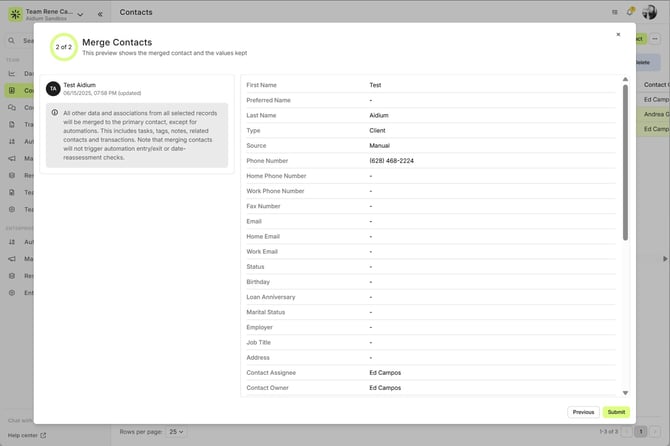
Success! Your contacts are now consolidated into one unified record.
Key Tips
- Double-check the Primary Contact’s automations and important fields before submitting.
- Be aware that merges cannot be undone, since records being merged into the Target are deleted.
- Only one value per field can be kept—plan carefully.
- Be mindful of SMS consent and partner marketing data.
- Always review automations, related contacts, and important fields before hitting Submit to avoid overwriting critical information.
- Double-check the Primary Contact’s automations and important fields before submitting.
- Be aware that merges cannot be undone, since records being merged into the Target are deleted.
- Only one value per field can be kept—plan carefully.
- Be mindful of SMS consent and partner marketing data.
- Always review automations, related contacts, and important fields before hitting Submit to avoid overwriting critical information.
After the Merge
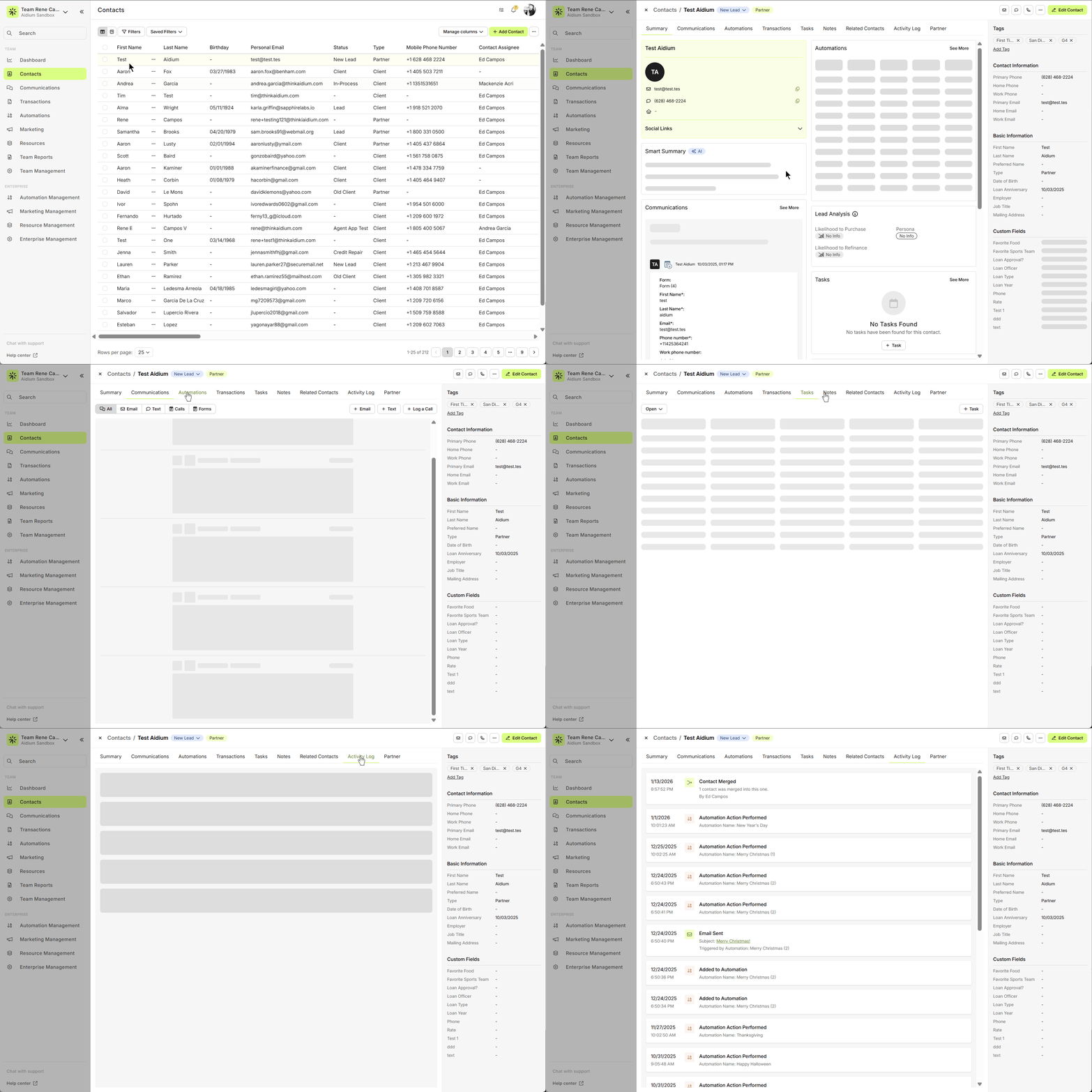
After submitting your merge request, the system will process things for a moment, and you'll see a success message. Refreshing the page will show the Target Record and any updated datapoints from the merge.
When you open the merged contact:
Go to the Activity Log, where you’ll find a clear entry indicating that a merge occurred.
You’ll also be able to confirm that all tasks, tags, notes, related contacts, transactions, and selected field values from the original records have been successfully consolidated into this single contact.
Why This Matters
Keeps your database clean and avoids duplicates.
Ensures that key information is retained and accurate.
Gives you full control over which data is preserved during merges.
Need more help? Check out: Contact View - Related Contacts
Keeps your database clean and avoids duplicates.
Ensures that key information is retained and accurate.
Gives you full control over which data is preserved during merges.
Need more help? Check out: Contact View - Related Contacts
Related Articles
Contact View – Related Contacts Tab
The Related Contacts tab in the new contact view makes it easy to link any contact to another using a relationship type. This helps your team quickly understand connections, keep track of referrals and partners, and streamline communication. There’s ...Using Mass Actions in Contacts
Mass Actions allow you to efficiently make changes or send communications to multiple contacts at once. Whether it's exporting, deleting, reassigning, or sending mass emails, Mass Actions simplify bulk updates. Before diving into Mass Actions, it's ...How to Delete Contacts and Transactions
Deleting one or many Contacts / Transactions can be done easily from list view in their respective pages. Whether you're cleaning up test data, removing duplicates, or streamlining your database, Lendware makes it easy to delete Contacts and ...Using Custom Contact Fields
Custom contact fields give you and your team the flexibility to capture the exact information you need about your contacts — in a way that works best for your process. While the built-in default fields cover the basics (like name, phone, or email), ...Contacts - Table View vs. Pipeline View
There are two easy-to-change views within Contacts. Table View, for a customizable list of contacts for a traditional spreadsheet style experience. While Pipeline View provides you with pre-sorted previews of each contact according to their Status. ...