Subscription Management (SMS and Email Opt-out) an Introduction
Providing easy methods for your clients and partners to opt-out of both email and SMS/text communications not only shows respect, but will also help keep you in compliance with current national and state/provincial laws.
There are two easy ways to opt-out a contact from email and/or SMS/text. In this article, we'll show you how a user can manually opt-out a contact from both mediums. We'll also show how straightforward it is for a contact to self-opt-out from either communication medium.
- How Opt-out Works
- How to View Opt-outs
- How to Manually Opt-out
- How a Contact Can Opt-out
How Opt-out Works
Communication opt-out for either email or SMS/text is an easy process for both the contact themselves and for a user in Lendware. By providing both methods, our clients and partners have every opportunity to inform us of their communication preferences with little effort.
This segmentation of email and SMS/text will allow our contacts to be in control of how they are communicated with - which will increase respect for their desires and help keep us legal and compliant.
When a contact is opted-out of a communication medium, it will no longer be possible for that type of message to be sent by any method - not by a contact based automation (lead nurture, newsletter and birthday greetings), not by transaction based automation (like loan milestone or documentation updates), not by a mass message (send manually to a group of contacts), and not directly.
There are two ways for a contact to opt-out:
- Self-service:
- Email: The contact can click the Unsubscribe link at the bottom of any email sent from an automation action or mass email.
If a contact opts-out of communication, it is not possible to have a User opt them back in. SMS/Text: At any time, the recipient of a text message (SMS) can reply with any one of the following opt-out keywords: STOP, STOPALL, UNSUBSCRIBE, CANCEL, END, or QUIT
If a contact opts-out of communication, it is not possible to have a User opt them back in. However, a contact is able to opt themselves back in by replying with a text with: START
- Email: The contact can click the Unsubscribe link at the bottom of any email sent from an automation action or mass email.
- By a User:
- Email: At any time, a user can opt-out a contact with a few clicks by using the Communications Preferences on the Contact Details page. When a user makes the opt-out decision, that user or another user on that team can opt that contact back in for email
- SMS/Text: At any time, a user can opt-out a contact with a few clicks by using the Communications Preferences on the Contact Details page. When a user makes the opt-out decision, that user or another user on that team can opt that contact back in for text messages.
- Email: At any time, a user can opt-out a contact with a few clicks by using the Communications Preferences on the Contact Details page. When a user makes the opt-out decision, that user or another user on that team can opt that contact back in for email
👍 This concludes how opt-out works. Keep reading, there's much more to learn!
How to View Opt-outs
Viewing if and when a contact has been opted-out is straight-forward and thoroughly documented with method, date/time and communication type. Below, we'll show each location on a Contact where we can view those details and what information is displayed.
- Contact - Summary tab - Communications Section
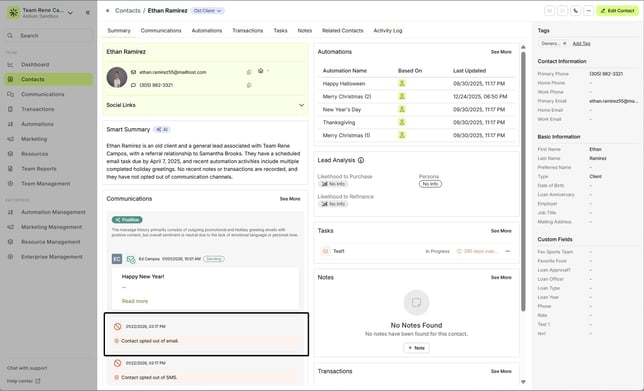 Additionally, it will always display 'who' opted the contact out.
- By a User:

- By the Contact:

If the contact is opted back in to communications, the opt-out notice will be removed. - By a User:
- Contact - Communications tab
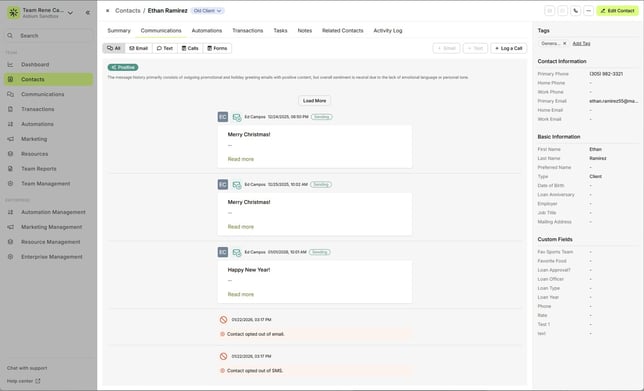
Similar to the summary page, opt-out notices will be removed if the contact opts back in - Contact - Activity Log tab

If the contact is opted back in to communications, the opt-out notice will remain in the activity log, as well as include the opt-in notice. - Contact - Communication Preferences
This will display the current communication 'Do Not Contact Settings'. We go into more detail in the following sections.
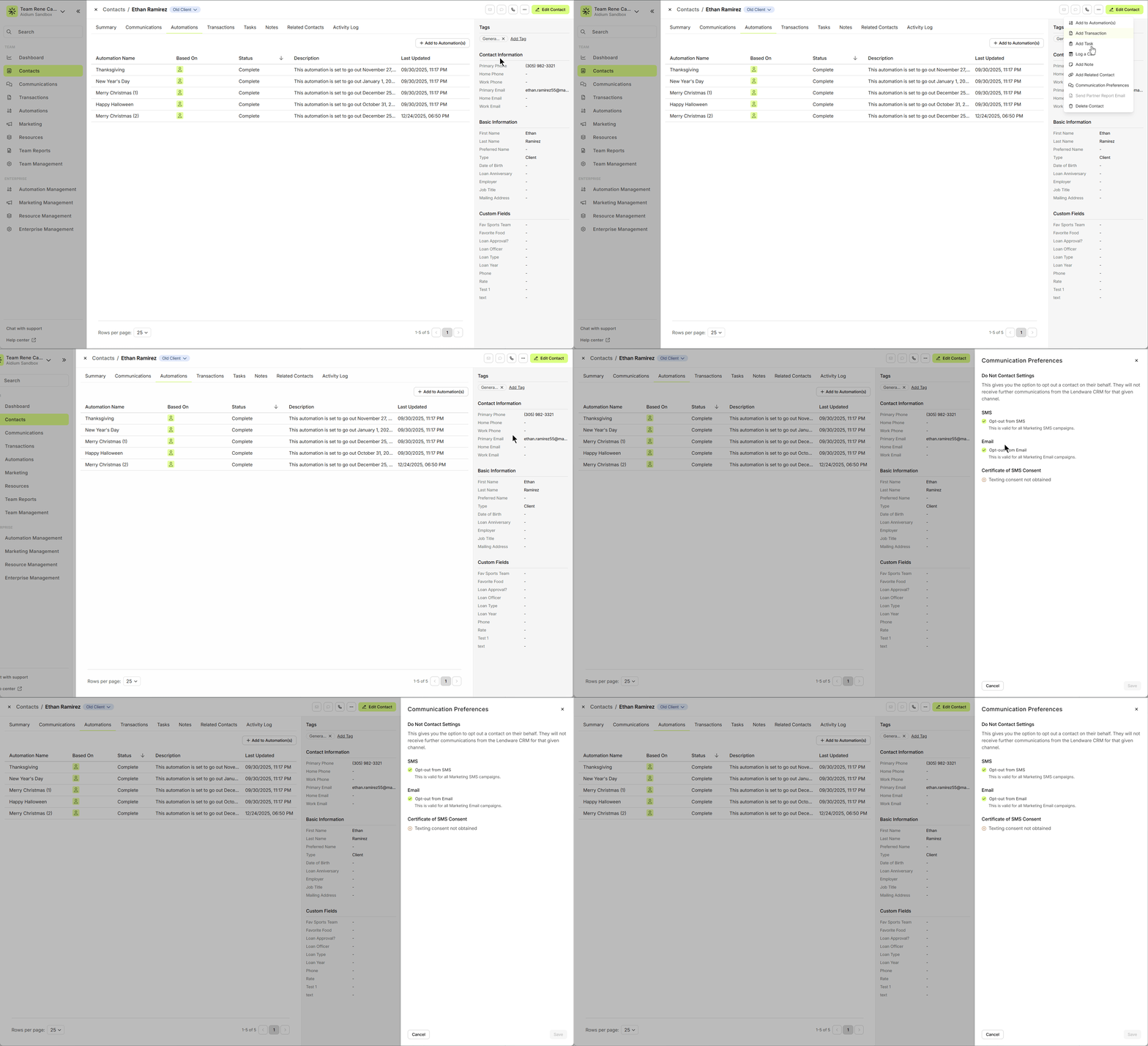
When a contact is opted-out
Since we're unable to email when a contact has been opted-out of email -and- we're unable to send a SMS/text when a contact has been opted-out of SMS/text - those options will be 'greyed-out' (disabled).
In the example below, we have a contact that has been opted-out of email communications. Highlighted is the Communications tab on this contact. Each button that would normally allow us to send an email is 'greyed-out'. Whereas, the '+ Text' button is still available.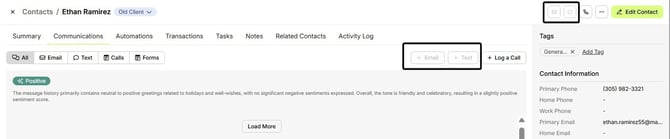
Additionally, any other location that normally allow us to email a contact will also not be available. In the example below, we'll show attempting to email this contact from a Task. The option that would normally allow us to send an email is 'greyed-out'. Whereas, the 'Send Text' option is still available.
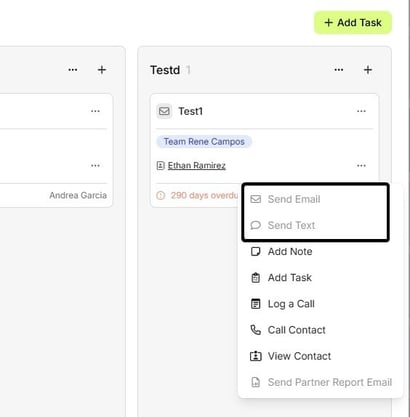
👍 This concludes methods for viewing opt-outs on a contact
How to Manually Opt-out
Sometimes, we'll either know from conversation, or be asked directly to opt-out a contact from either email or SMS/text. It is our responsibility to respect the client or partner communication choices and take appropriate action.
First, we'll simply find and open the contact.
- Once the contact is opened, we'll click the 'More Actions' button [...] at the top-right.
- After clicking, a drop-down will display all of the additional actions available. In this case, we want to choose 'Communication Preferences'.
- Next, Communication Preferences slide-out will appear at the right showing us the following options:
- SMS (text) - Opt-out from SMS
- Email - Opt-out from Email
- As demonstrated in the animated GIF below, we show how to check the communication medium(s) to manually opt-out from Email.
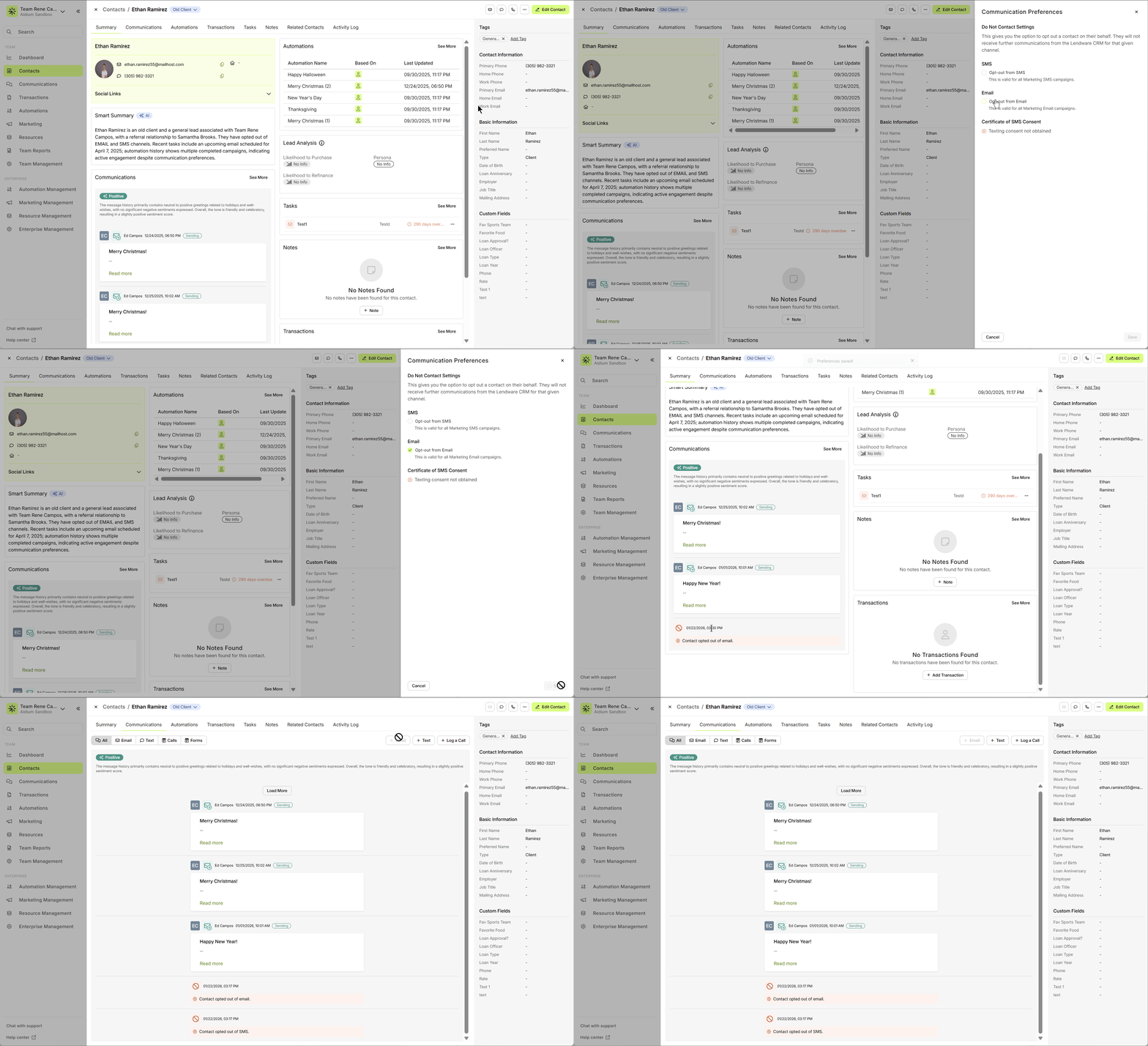
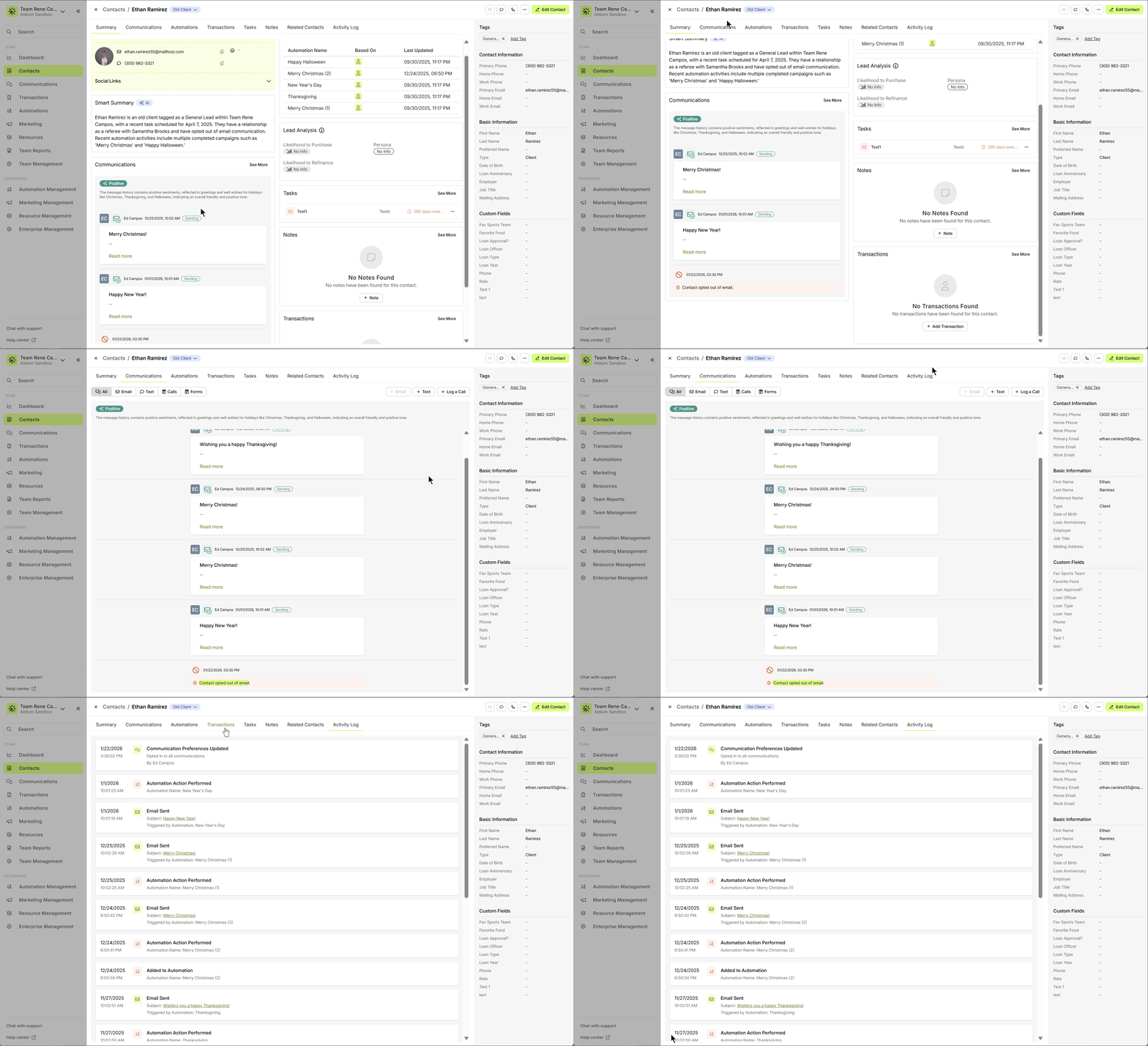
- Going forward, this contact will not receive automation email actions, mass email, or direct email. As shown in the animated GIF below, these actions are well documented on the Summary, Communications and Activity Log tabs.
- Anytime we manually set a communication medium to 'Opt-out', we have the ability to opt the contact back in. We'll simply follow the same steps as seen in the animated GIF below.
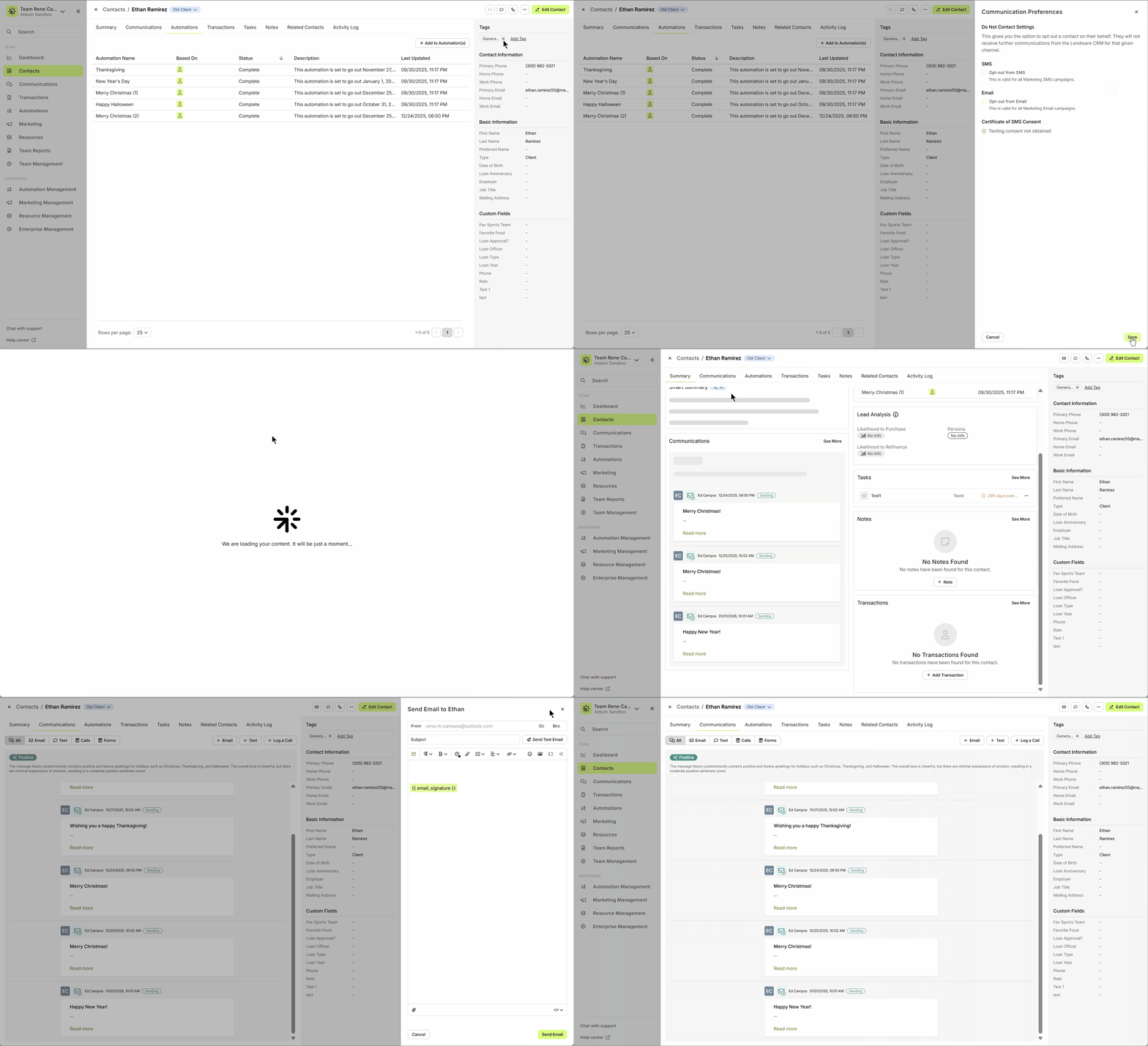
🚧 If a contact opts-out themselves, a user cannot opt them back in
This concludes manually setting a contact communication medium to opt-out
How a Contact Can Opt-out
Contacts can intuitively opt-out of communications. Not only will this help build respect and trust between us and our clients and partners, but it will help keep us legal and compliant.
At any time, a contact can opt-out of either email or SMS/text by using the following methods:
Email:
Every email sent from an automation action or by mass email, will include an opt-out link at the bottom of the email. This link is descriptive and obvious.
In this example email, we'll see the opt-out text and link located at the bottom of the email.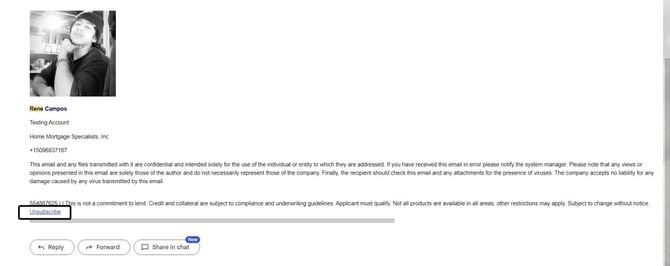
Once the contact clicks the link, it will opt them out of email communications and display feedback that it happened.
⚠️ Important: Forwarded Emails & Unsubscribe Behavior
The unsubscribe link is tied only to the email address that originally received the message.
Common scenario: An email is sent to rene@company.com and is automatically forwarded to office@company.com. If someone attempts to unsubscribe using the forwarded email address, the unsubscribe request will not be processed and an error message may appear.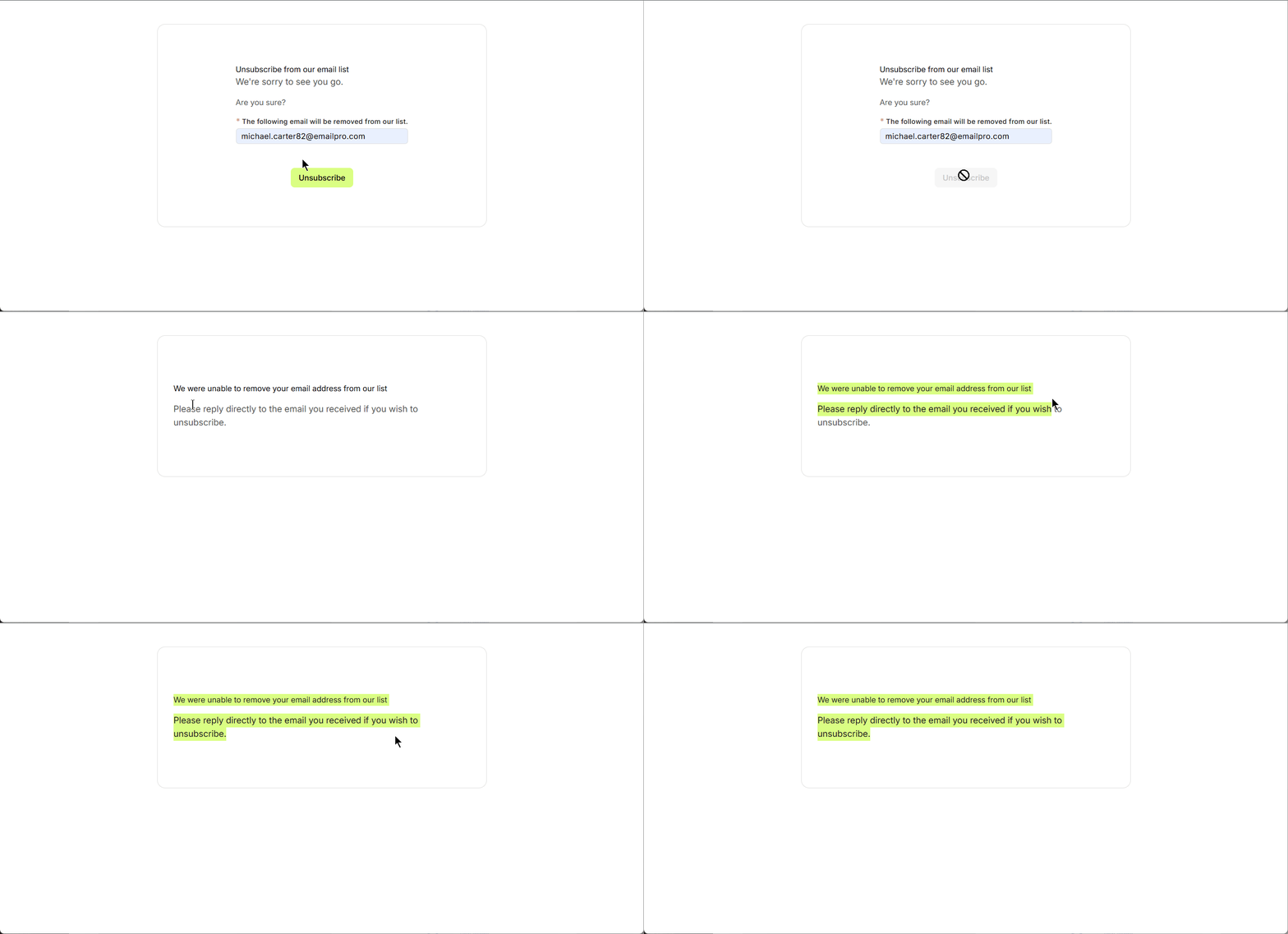
This is expected behavior and indicates the system is working correctly, since unsubscribe actions must match the original recipient email for compliance and security reasons.
How to resolve: The unsubscribe link must be used from the original recipient’s inbox. Alternatively, a user can manually manage the contact’s opt-out settings via Communication Preferences (if applicable)..
SMS/Text
At any time, the recipient of a text message can reply with any one of the following opt-out keywords: STOP, STOPALL, UNSUBSCRIBE, CANCEL, END, or QUIT
This will automatically opt them out of SMS/Text messages going forward. This includes from any automation or direct text messages.
This concludes how a contact can opt-out of communications
Need more help? Check out: AI Summarization & Sentimental
Related Articles
Communications Page Overview
The Communications page is your team's centralized inbox for managing email and SMS/text conversations with contacts. It’s designed to provide a clear, organized way to track all recent communications across your team. To get started, click on ...Email Templates in Lendware: Creation, Management, and Usage
Design once, reuse everywhere—create consistent, branded emails across teams with full control over layout and content. Email Templates in Lendware allow you to create reusable, visually rich emails using the Lendware Email Template Builder. These ...Ways to Send and Respond with Text Message or Email
In just about any place that you find a contact referenced, a text message or email can be quickly sent to that contact. We'll show all the ways that you can send text message or email to a contact within Lendware. Communication is key in building ...Email and Automation Merge Fields
Merge fields dynamically pull personalized data - such as a client's name, address, and/or related contact into emails. Merge Fields are placeholders in Lendware that dynamically pull personalized data—such as a client’s name, loan amount, or ...View & Reply to SMS on Your Mobile
Staying connected with your contacts on the go has never been easier! With SMS forwarding set up, you’ll get instant notifications right on your phone — just tap the link to jump into Lendware and reply in seconds. In the quick video below, you’ll ...