AI Summarization & Sentiment Analysis
Lendware’s AI Summarization and Sentiment Analysis features help you quickly understand your contacts and communications — without having to read through every note or message.
AI Summarization
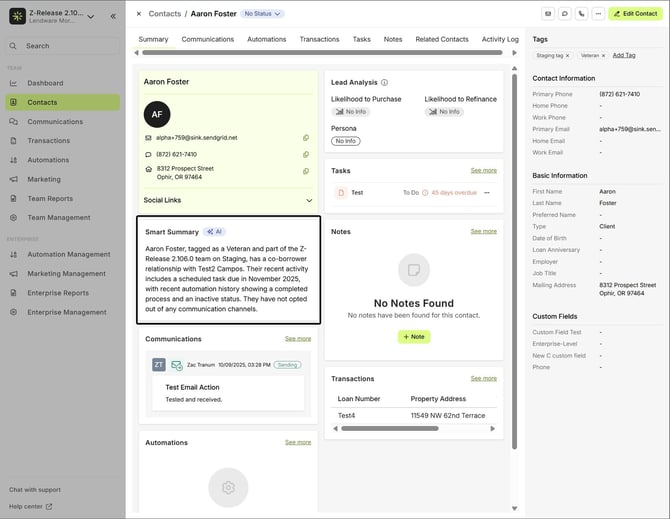
The Smart Summary provides a quick, AI-generated overview of a contact’s key details and recent activity.
Where to Find It
Currently, the Smart Summary is available inside a contact’s profile, in the Summary tab.
✨Smart Summary (AI)
What It Does
- Automatically summarizes the contact’s essential information.
- Highlights role, relationship type, contact info, and notes.
- Updates dynamically as new details are added.
💡 Smart Summaries are read-only for now, generated automatically based on available data.
💡 Smart Summaries are read-only for now, generated automatically based on available data.
💬 Sentiment Analysis
The Sentiment Analysis feature uses AI to detect the tone of your conversations, helping you understand how interactions are going at a glance.
Where to Find It
You can view sentiment tags in two places:
- Inside a contact’s Communication tab
- Or directly from the main Communications tab on the left-hand panel
Sentiment Types
- Positive (Green): Indicates a friendly or successful interaction.

- Neutral (Dark Gray): Reflects balanced or factual communication.

- Negative (Red): Signals frustration or an issue that may require follow-up.

💡 Why It’s Useful
- Instantly gauge client satisfaction and tone.
- Spot which conversations might need attention.
- Track overall sentiment trends to improve communication strategy.
Sentiment in Automations
Beyond simple tone detection, Sentiment Analysis can actively influence your automations.
How It Works
Sentiment Evaluation
The AI reviews the latest communication and assigns a sentiment score (Positive, Neutral, or Negative).
Recommendation Trigger
Based on that tone, the AI generates a suggestion — for example:
“The message content is neutral, primarily consisting of informational and disclaimer text with no emotional tone.”
User Notification
The targeted user (Contact Assignee or Contact Owner) receives a notification showing:
The record the suggestion applies to
The AI’s recommendation message
A text area for adding notes or merge fields for more context

Decision Control
The user can then choose Yes or No directly from the notification to continue or stop the automation.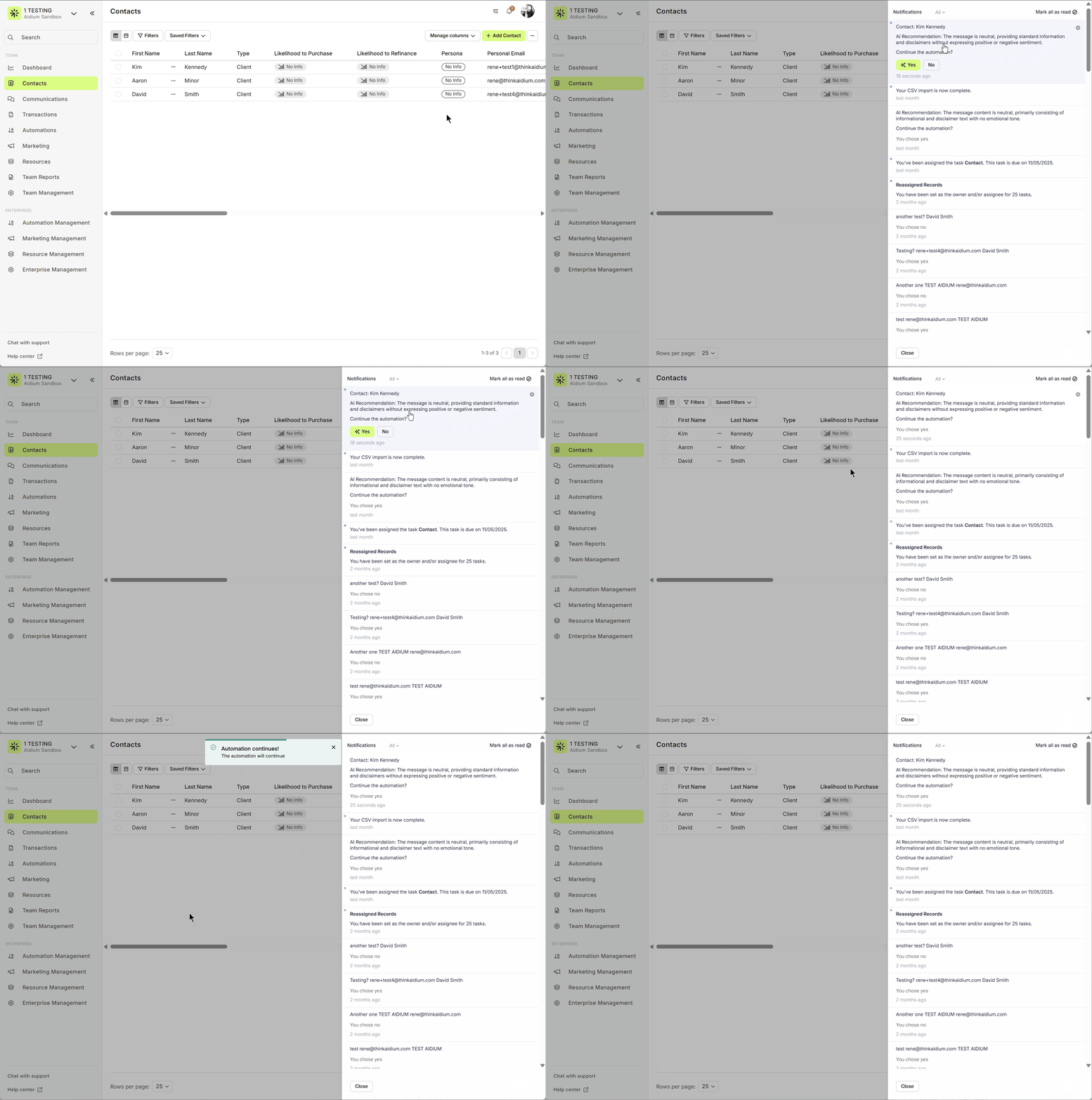
💡 This feature integrates seamlessly with Lendware, helping automate responses, reduce manual follow-ups, and ensure every client interaction feels personal and well-timed.
Sentiment Evaluation
The AI reviews the latest communication and assigns a sentiment score (Positive, Neutral, or Negative).
Recommendation Trigger
Based on that tone, the AI generates a suggestion — for example:
“The message content is neutral, primarily consisting of informational and disclaimer text with no emotional tone.”
User Notification
The targeted user (Contact Assignee or Contact Owner) receives a notification showing:
The record the suggestion applies to
The AI’s recommendation message
A text area for adding notes or merge fields for more context
Decision Control
The user can then choose Yes or No directly from the notification to continue or stop the automation.
💡 This feature integrates seamlessly with Lendware, helping automate responses, reduce manual follow-ups, and ensure every client interaction feels personal and well-timed.
Real-Time Updates
Both Smart Summaries and Sentiment Analysis update automatically whenever new information or interactions are detected — ensuring your insights stay current.
🚀 Part of Lendware’s Expanding AI Toolkit
Together, Smart Summaries, Sentiment Analysis, and AI Recommendations help you:
Save time reviewing contacts
Understand client sentiment faster
Make smarter, data-driven automation decisions
Together, Smart Summaries, Sentiment Analysis, and AI Recommendations help you:
Save time reviewing contacts
Understand client sentiment faster
Make smarter, data-driven automation decisions
Need more help? Check out: Meet the AI Email Editor
Related Articles
Lendware Predict – Overview
Lendware Predict is an AI-powered feature that enriches contact records with insights about their likelihood to purchase or refinance. How It Works Once enabled for a team, Lendware Predict runs automatically each day at 8:00 AM in the team’s ...Lendware Agents: Intelligent Suggestions That Put You in Control
Lendware Agents bring the power of your CRM directly to you—surfacing timely prompts and executing approved actions—so loan officers can focus on building relationships rather than navigating screens. Explore the Library of Lendware Agents You can ...