Lendware Predict – Overview
Lendware Predict is an AI-powered feature that enriches contact records with insights about their likelihood to purchase or refinance.
How It Works
Once enabled for a team, Lendware Predict runs automatically each day at 8:00 AM in the team’s timezone.
Each day, the system updates a configured number of the most relevant records per eligible user/team combination.
The daily limit is determined during setup and may vary.
Enrichment updates the contact record with predictive scoring data.
The process continues daily until all eligible records have been enriched.
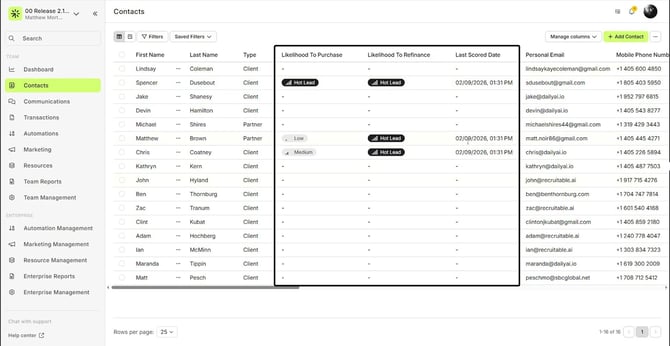
Fields Added to Contact Records
When Lendware Predict is enabled, the following fields become available in the contact table and contact details page:
1. Likelihood to Purchase
Indicates the predicted likelihood that the contact will purchase.
2. Likelihood to Refinance
Indicates the predicted likelihood that the contact will refinance.
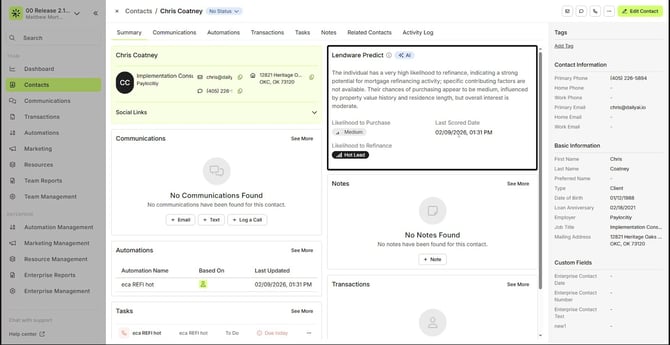
3. Score Summary (Contact Details Page)
A Lendware Predict card appears on the contact details page and includes:
Purchase likelihood
Refinance likelihood
AI-generated explanation of contributing factors
Last Scored Date
4. Last Scored Date
Displays the most recent date and time the record was scored.
Using These Fields
These fields can be used in:
Filters
Saved views
Automation entry conditions
CSV Export Limitation
⚠️ Likelihood to Purchase, Likelihood to Refinance, and Last Scored Date will not be included in CSV exports — even if those columns are visible or selected in the table view.
Exports will still complete successfully, but these predictive fields will not be part of the exported file.
⚠️ Likelihood to Purchase, Likelihood to Refinance, and Last Scored Date will not be included in CSV exports — even if those columns are visible or selected in the table view.
Exports will still complete successfully, but these predictive fields will not be part of the exported file.
AI Disclaimer
Lendware Predict provides AI-generated insights based on available data models. While these scores and explanations are designed to assist with prioritization and outreach strategy, they are predictive in nature and may not reflect actual customer intent.
Users should apply professional judgment when making business decisions based on AI-generated content.
Lendware Predict provides AI-generated insights based on available data models. While these scores and explanations are designed to assist with prioritization and outreach strategy, they are predictive in nature and may not reflect actual customer intent.
Users should apply professional judgment when making business decisions based on AI-generated content.
Need more help? Check out: AI Summarization
Related Articles
AI Summarization & Sentiment Analysis
Lendware’s AI Summarization and Sentiment Analysis features help you quickly understand your contacts and communications — without having to read through every note or message. AI Summarization The Smart Summary provides a quick, AI-generated ...Lendware Agents: Intelligent Suggestions That Put You in Control
Lendware Agents bring the power of your CRM directly to you—surfacing timely prompts and executing approved actions—so loan officers can focus on building relationships rather than navigating screens. Explore the Library of Lendware Agents You can ...