This article explains how "On the date" automation conditions work, why historical records can unexpectedly trigger automations, and how to configure your automations correctly to avoid future issues
Key Concept: "On the Date" Does Not Include the Year
The most important thing to understand:
"On the date" conditions only evaluate the month and day (MM/DD), not the year.
This means the automation is not checking when the event happened — it is only checking whether the record has that date value present.
Example
A transaction was Funded on 12/22/2020
An automation uses the entry condition:
On Transaction Funded Date
When the automation evaluates records on 12/22 of any year, that transaction can qualify — even though it funded years ago.
Key Point: "On the date" only checks month and day (MM/DD), ignoring the year.
Why This Happens
"On the date" is an event-based condition, not a date-range filter.
In simple terms, the automation logic is asking:
Does this record have a funded transaction date?
If the answer is yes, the record can enter the automation when the date condition is met — regardless of how old the transaction is.
Because there is no built-in year comparison, the automation does not distinguish between:
A transaction funded last week
A transaction funded several years ago
Common Impact
When this condition is used by itself, you may see:
Emails or texts sent to borrowers with historical transactions
Messages triggering around holidays or anniversaries
Multiple unexpected sends when automations are re-enabled or re-evaluated
This behavior is expected unless additional safeguards are added.
Best Practice: Always Add a Date Cutoff
To prevent historical records from entering an automation, you should always pair an "On the date" condition with a second date-based filter.
Recommended Configuration
Use both of the following entry conditions:
On Transaction Funded Date
AND Transaction Funded Date is greater than [specific cutoff date]
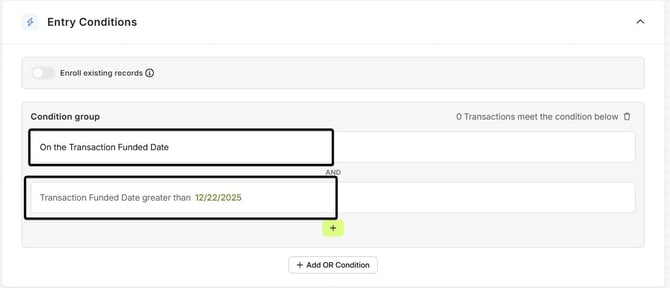
This ensures:
- The automation only runs on the intended calendar date
- Only recent or future transactions are eligible
- Older records are permanently excluded
Why the Cutoff Date Matters
The cutoff date changes the logic from:
Has this transaction ever been funded?
to:
Has this transaction been funded after a specific point in time?
Without the cutoff, the automation cannot tell the difference between a funded loan from years ago and a current one.
When to Use This Approach
You should apply this setup for automations such as:
- Funded milestone messages
- Anniversary or follow-up communications
- Holiday or seasonal automations
- Any automation using an “On the date” transaction condition
Summary
"On the date" conditions do not evaluate the year
Historical records can trigger automations if no cutoff is applied
This behavior is expected based on how date logic works
Adding a "greater than a specific date" condition is the correct and recommended solution
If you’re unsure whether an automation is configured safely, our support team can help review it with you.